Over the past few months, we’ve been researching how we could enable Postman features (such as the scheduler, API integrations, webhooks, etc.) and integrate them into our API development. Honestly, at first we didn’t even notice that Postman had features that could be integrated into CI/CD pipelines. As far as I can tell, at least in my team (the Mobile App Engineering team), we consume 250+ APIs collected from different services, such as backend (primarily), the data engineering team, marketing, company services, and so on. To be honest, from the mobile engineers’ point of view, the API response bodies seemed pretty whacky, and we could never tell whether the APIs that had just been (or recently) deployed were valid or not. After almost a week of observing, these were the key findings:
- Frequently mismatched data types (violating and silently bypassing the schema contract)
- Frequent changes in API requirements
- The Mobile App team doesn’t know whether the APIs are valid or not (we still receive information about the deployment status, but like I said, we don’t know whether the response body is valid)
- Misunderstandings and back-and-forth validation between the two teams became a daily activity
TL;DR: We started designing and building automated API tests with Postman so that changes don’t affect or break the APIs in production or during development. The idea is pretty handy: after backend development is done, the automated tests verify and validate the response against a JSON schema. This lets us maintain a single source of truth for API design and development, relying on our schema, and ensure all teams are working toward the same design.
We do this by writing test suites, which has several advantages. We avoid running the same test over and over by testing multiple instances of the same request with parameterization (handled by Postman), and then use the Postman runner to automatically run and debug the test suites we’ve created. The final step is streaming the results into the CI pipeline (GitLab CI enables this), for example to build more robust tests by displaying coverage to improve code quality, showing test results to eliminate failing tests, reusing all test suites in our custom CI pipeline, or aggregating the test suite results (whether the build fails or not) into the API documentation.
So, what did we do? Eventually, we tried and experimented with every one of them:
- To eliminate the “is the response body valid or not” issue, I created test scripts in the Postman collections to verify and validate the response body. The script is pretty simple: you just write a single class for every API endpoint that handles object validation. Something like, if the response body contains more than 5 items, throw an error, or something along those lines.
- To eliminate the “frequently mismatched data types” issue, it’s a tricky one. You need to know beforehand how the APIs under test behave, and you also need to create a JSON schema that validates whether each object in the JSON has the correct data type that will be accepted.
- Eliminating the last issue, external changes in APIs, is really difficult. Sometimes, and somehow, it depends on the API response time or non-functional aspects, or it could be unexpected changes such as interrupted API calls, non-rendered image types, a misplaced content-type in the request body, a different MIME type for processing documents, and so on.
Finally, a temporary solution emerged, handcrafted into a flow for integrating this Postman automation.
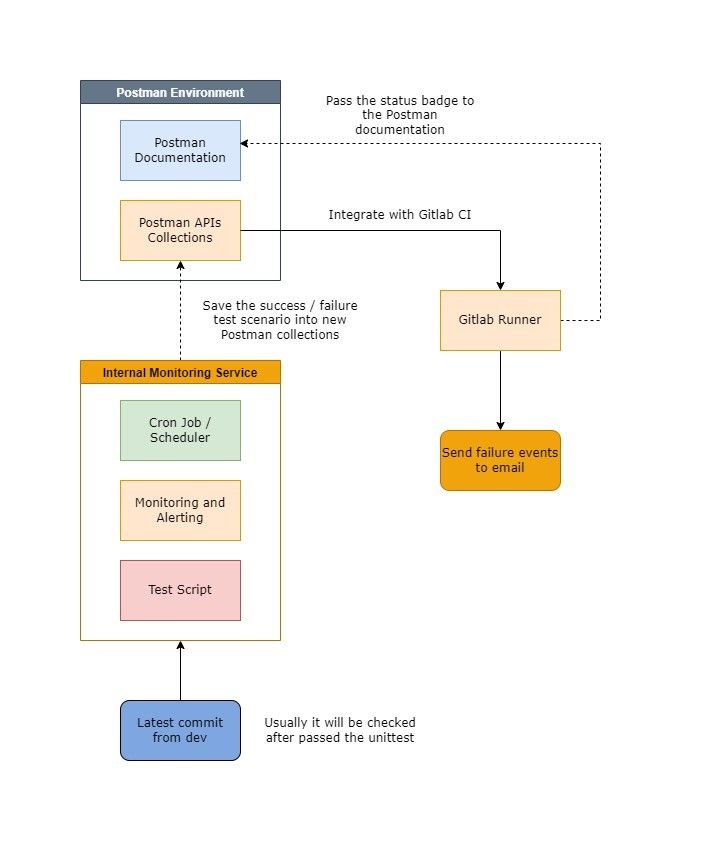
The Postman flow for this API development is straightforward. Every time developers deploy the current features, the deployment is tracked through the source-code repository integration and triggers a Postman monitor (it’s pretty similar to the “git hooks” approach, but easier to use since Postman already handles it). For the validation itself, for example to checek whether the API deployed by the backend engineering team fails or not, the Postman collections contain automated test scripts that check whether the API endpoints, response bodies, object validation, and so on match the latest build from the backend.
Afterwards, the Postman collections, bundled as .json, are hooked into GitLab CI to run the automated tests. In the GitLab environment, we need to configure and set up the CI pipeline with a cronjob that periodically builds the API collections (I’ve set it up to run once a week, every Monday morning), and the results from GitLab and the Postman collections are collected and executed by Newman. Newman is a command-line collection runner for Postman. It enables you to run and test a Postman collection directly from the command line.
In the last step, if the build passes, it automatically sends a status badge to the Postman documentation. Otherwise, if the build is failing, the team is notified through a shared team email.
Conclusion
After a few weeks of implementing and integrating this flow into our CI pipeline, automated testing with Postman scripts has had a big enough effect on every side:
- The Mobile App team no longer needs to verify with the backend/data/other teams themselves whether the API responses are correct or not
- We iterate and work faster to ship the latest product, because all response objects are automatically verified
- There are no breaking API changes during development and production, so it’s easier for developers to do TDD on new features
- Daily monitoring and reporting without interrupting others’ work, thanks to the automated test suites we’ve written and the Postman scheduler
- If there’s an issue, we can revert or roll back the APIs to a previous version using the built-in version control
Nevertheless, this flow still has many flaws, limitations, and some redundancy in certain aspects, including:
- We’re using (exactly) two cronjobs for monitoring and periodically running the tests. The first one is set up in GitLab CI and the second one in the Postman scheduler. To be fair, I also don’t know why I’m doing this (HAHA). My original idea was to see how many times in a week these API tests fail or succeed, which is what the GitLab setup does, while the cronjob in Postman itself serves a different function.
- Apart from that, running the Postman scheduler for daily usage consumes quite a lot of resources, and there’s also a time delay in GitLab when running the cronjob scheduler.
Question
If someone would like to ask, “why don’t you just use the Postman scheduler per se?”
My answer’s simple: this idea and solution are far cheaper than using the Postman scheduler, and we don’t need to pay for it (and to be honest, this is a clever solution lolz).
If I remember correctly, the Postman scheduler is free, but it has limitations, and you can’t run it beyond a certain point every day (while in our case, we need to run the integration tests every day). And if we’re going to pay for a Postman subscription just for that feature, I don’t think it would be a good idea, since we’d be throwing away a fair amount of money, right?
Kudos
Thank you very much, and big kudos to the product engineering team that was involved!